What a ready-mix supplier needs from its software
Ready-mix concrete is a delivery business with a clock running. Once a truck is loaded, the concrete has limited time to reach the forms, and a pour stops when trucks arrive too late. Most suppliers still run the day on phone calls, a whiteboard and paper delivery notes, which means the plan lives in the dispatcher's head.
A platform for this trade has three groups of users. Contractors and self-builders need to order the right concrete for a given time and know how the pour will run. Dispatchers need every order, truck and pump on one board, with clashes visible before anything leaves the plant. Drivers need the next job, directions to the site and a delivery note they can complete on a phone. Above them, plant managers need delivered volumes and on-time figures without building a spreadsheet each week. Each group sees different screens, and permissions follow from that.
How the Valuvuoro demo works
Valuvuoro is a fictional supplier created by VirtueInfo. Its company, customers, trucks and figures are sample data, and the demo needs no sign-in. Changes stay in your browser and a reset button restores the starting day. Finnish is at the root and English under /en/.
Ordering with a delivery plan
The customer picks the municipality, the pour date and start time, the volume and the concrete: strength class, exposure class and consistency. They say whether a pump is needed and how fast the crew can place concrete. The plan appears at once: number of loads, arrival interval and pour duration. Choosing a freeze-thaw exposure class brings up a reminder about air-entrained concrete, and a pour rate too high for chute discharge is flagged.
The dispatch board
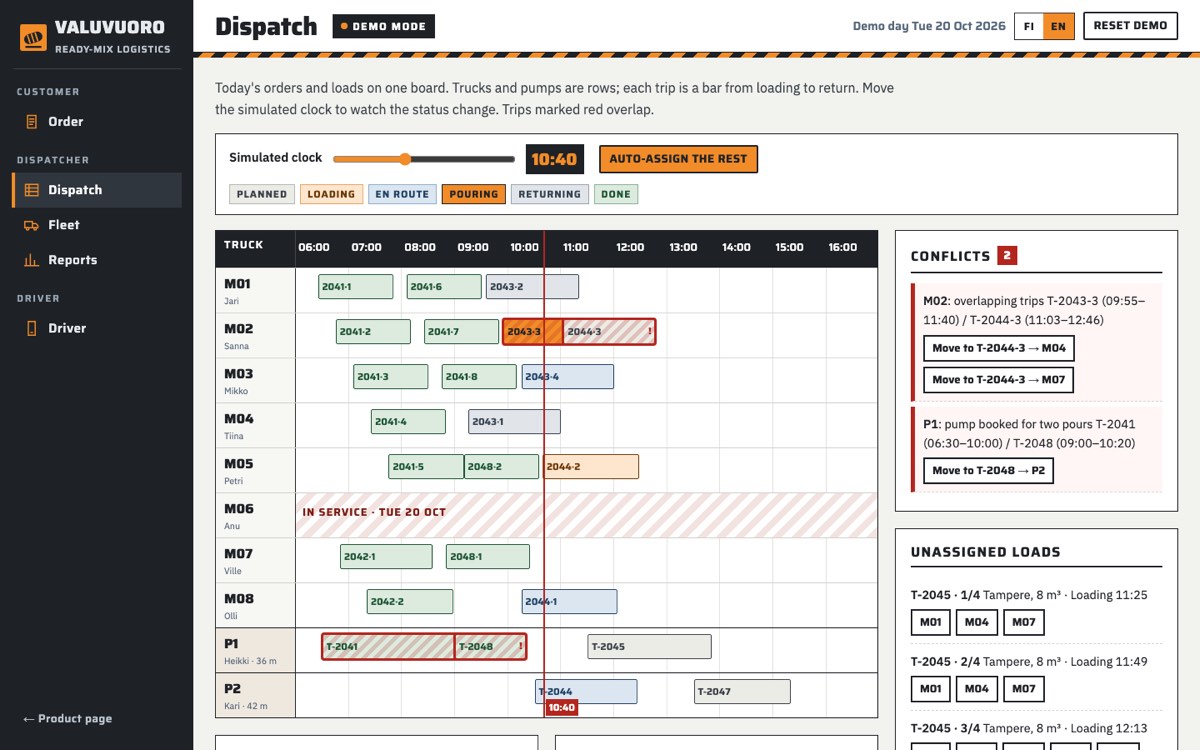
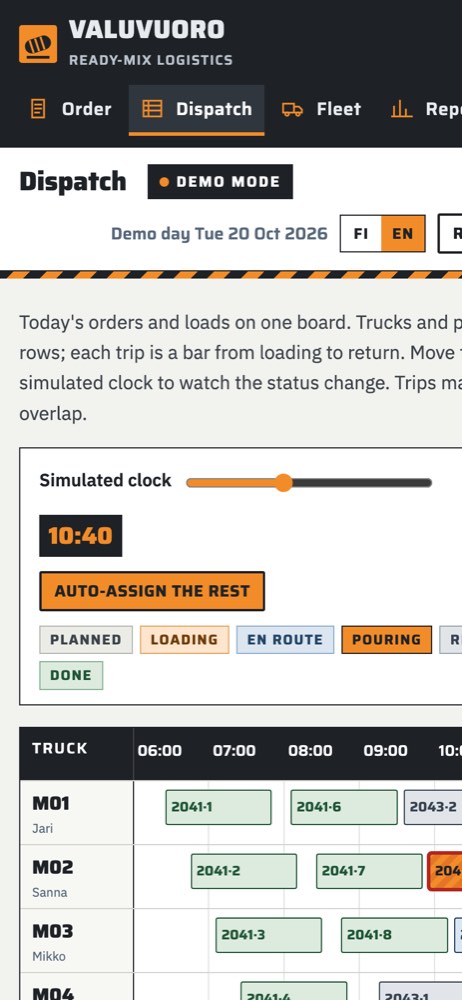
Trucks and pumps are rows, and each trip is a bar covering loading, driving, discharge, return and washing. A simulated clock moves statuses from loading to en route, pouring and returning. The conflicts panel lists overlapping trips and any pump booked for two pours, and its move buttons only offer units that are free. Afternoon loads start unassigned, so you can pick a truck under each load or press auto-assign. A truck in the workshop cannot be chosen.
Fleet, driver and reports
The fleet screen lists eight mixer trucks and two pumps with status, meter reading and service due date, and shows their positions on a schematic map at the selected time. The driver screen shows the next delivery, site directions and the electronic delivery note with loading time, volume and use-by time. The driver records any water added, the receiver signs with a finger or by name, and marking the job delivered updates the board. Reports cover ten working days of sample data.
One calculation for everyone
The order form and the dispatch board share the same formulas, so the customer and the dispatcher see identical figures. The demo publishes them: a 64 m³ pour at 24 m³/h needs eight loads, one every 20 minutes, and five trucks to keep the crew working.
What a production system adds
The demo proves the screens and the planning logic. A live platform connects them to the rest of your operation.
- Links to your batching system so confirmed loads reach the plant
- Vehicle positions from your tracking provider instead of the schematic map
- Delivered volumes passed to invoicing, with the signed delivery note attached
- Customer accounts, order changes routed to the dispatcher for approval and notifications to site
- Roles for customers, dispatchers, drivers and managers, with an audit log of changes to orders and assignments
- Drive and cycle times learned from your own recorded trips
- Backups, monitoring and a driver view that copes with weak mobile coverage
Personal data stays limited to what the work needs, such as a driver's name and a receiver's signature, with retention rules agreed up front.
Market notes
Finland
Finnish sites specify concrete with the European classes the demo uses: strength such as C30/37, exposure such as XC or XF, and consistency such as S3 or F5. Winter work matters, so freeze-thaw classes and air-entrained mixes should be part of the order form. The interface should be in Finnish first, with Swedish where your customers need it and English for foreign crews. Contractors expect the business ID (Y-tunnus) on delivery notes and invoices, and electronic invoicing to their accounts.
India
Customers often confirm orders and arrival times by WhatsApp, so status messages there are useful. Interfaces are usually in English with a regional language added.
The USA
Orders are placed in cubic yards with strength in psi, so units must change throughout.
Canada
Metric units apply, and Québec plants need French screens and delivery notes.
Australia
Concrete is ordered by grade and slump in metric units. The order form adapts to the local naming.
How we run a dispatch platform project
Discovery starts at your plant. We sit with the dispatcher for a day, collect your delivery notes and list the systems the platform must talk to. From that we agree a first release, often the dispatch board and driver view, with customer ordering following in the next phase. Each phase ends with a working version your team tries on real days before we move on.
A dedicated team stays with you through the build, and after launch we maintain the system and adjust it as your fleet grows. If the driver side needs to become a native app, our mobile app development page describes how we build those. To discuss your plant or ask for a quote, contact us.