What solar buyers need from an installer's website
Someone looking at rooftop solar usually starts with a bill in hand. They want to know how big a system they need, whether their roof has the space, what it costs, how much they will save and how long it takes to pay back. They have heard about a subsidy and are not sure how it works or whether to trust what an installer says about it.
Business owners come with a different set of questions. A workshop, hotel or school wants a plant sized to the load it draws in daylight, and wants to compare buying the system with signing a power purchase deal.
So the website has to show the arithmetic in public, explain the subsidy without overselling it, split home and commercial work, and make the free roof survey easy to book. Every figure needs a label saying whether it is a sample, an estimate or a quote.
How the demo handles it
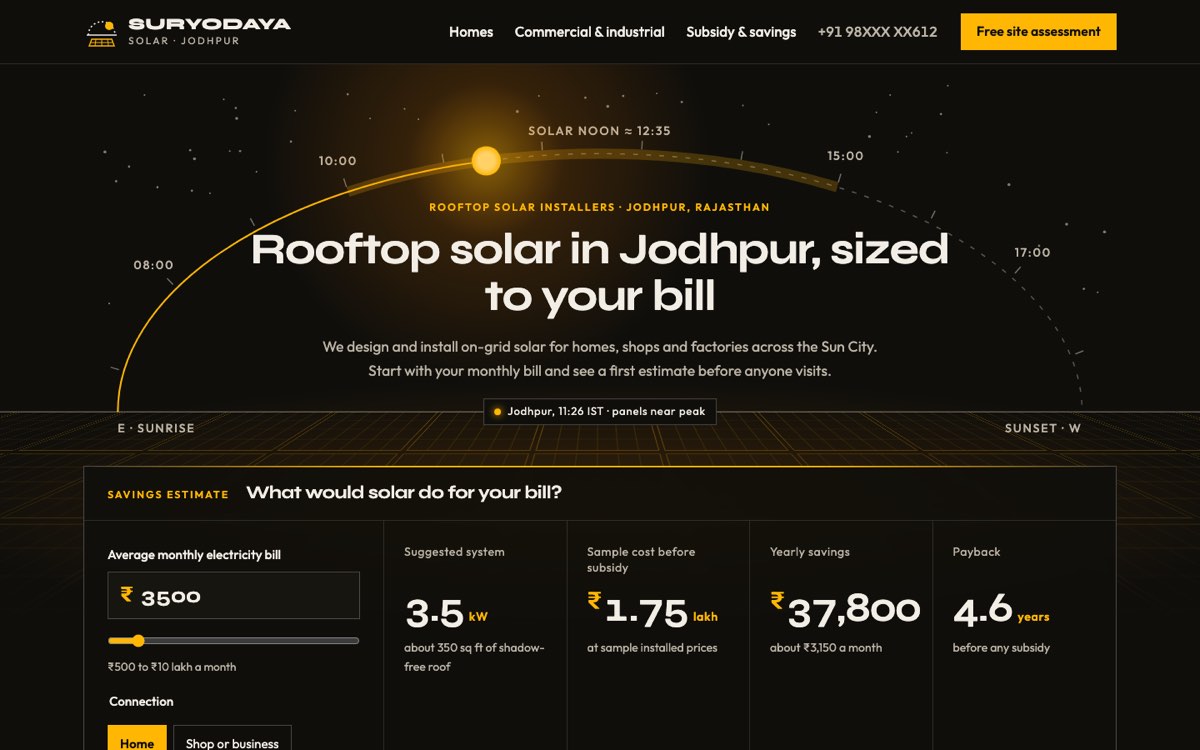
Suryodaya Solar is a fictional business that VirtueInfo created for this demo. It is not a client, and its prices and reviews are marked as samples on the page. Everything else works, so you can use it the way a homeowner would.
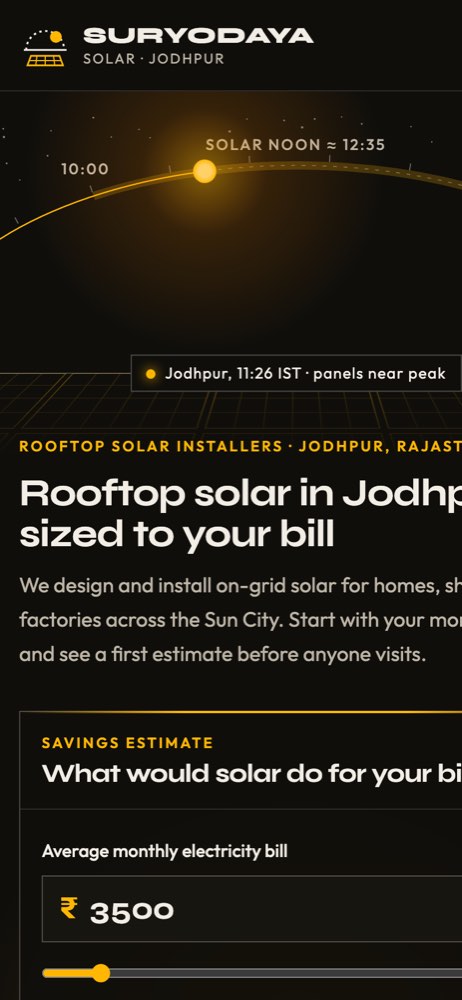
The signature feature is the savings calculator in the home page hero. A visitor types an average monthly bill, chooses home or business, and sees a suggested system size, the roof area it needs, a sample cost in lakh, yearly savings and a payback period. The assumptions are written directly underneath. A button then opens the site assessment form with the bill, connection type and size filled in.
Behind the calculator, the hero draws the sun's path over a roof from east to west, with the peak generation hours marked and the sun placed at the current Jodhpur time. Inner pages repeat a small version at a different hour. The home page then covers local conditions (desert dust, summer heat, pre-monsoon storms, terraces people still use) and a five-step process from survey to handover.
The homes page compares three typical system sizes with roof area, daily generation and a sample price, lists what an installation includes and explains on-grid versus battery systems. The commercial page lists the kinds of businesses that suit solar, how a plant is sized from a year of bills, and the choice between owning the plant and paying per unit.
The subsidy page explains who can get support, the four steps of a claim and how net metering works, with a chart of daytime surplus and evening use. It shows no subsidy amounts and links to the official portal instead. The assessment form validates a 10-digit mobile number and accepts an optional photo of a bill.
Local SEO built in
Every page carries structured data using the schema.org HomeAndConstructionBusiness type, with the business name, phone, the city and localities served, opening hours and payment methods. Service pages add Offer data and breadcrumbs, and the subsidy page carries FAQPage markup for its questions.
Titles match local searches such as "rooftop solar Jodhpur", "commercial solar Jodhpur" and "solar site survey Jodhpur". The neighbourhoods served are listed as text on the home page and in the form. The name, phone and hours match what you would put in your Google Business Profile.
The artwork is SVG drawn in code, with no photos, and the fonts are self-hosted. Pages load quickly on a phone. Search engines are told to skip the Suryodaya Solar demo. When we build for a real solar installer, the site is indexable from launch, with canonical tags and a sitemap in place.
Notes for each market we serve
India
The demo is already built for India: Indian English, rupees in lakh, UPI among payment methods and WhatsApp next to every booking button. The subsidy page names the national scheme and sends people to the official portal. Your rooftop vendor registration, GSTIN and contractor licence have their own places on the page.
USA
We use American spelling, dollar prices and a ZIP code service area. Incentives and net metering rules differ by state and utility, so the subsidy page explains the general process and links to official sources. Your contractor licence number goes in the footer.
Canada
We use Canadian spelling and Canadian dollars, and build a full French version for Québec. Programmes and grid connection rules vary by province and utility, so the site explains the steps and links to the official programme pages. Snow and short winter days can be part of the generation explanation.
Australia
We use Australian spelling and prices in Australian dollars with GST. Installers usually show their ABN and accreditation details. The calculator can include feed-in credits, set to the figures you supply for each retailer or network.
Finland
We build the site in Finnish and Swedish, with English where it helps, and show prices in euros including VAT. Your business ID goes in the footer. Low winter sun changes the payback story, so monthly generation estimates matter more than a single yearly figure. Homeowners can claim the household tax credit on the labour share, which the quote can show.
What we deliver and how the project runs
We design the site to your brand, not the Suryodaya look, and set the calculator's tariff, generation and pricing assumptions with you.
Assessment requests and calculator results go to your email, WhatsApp, your CRM or your booking system. When rules or tariffs change, the assumptions are a short edit.
At hand-over you get the code, hosting and a guide to updating prices, areas and subsidy text. We maintain the site and can run search and ad campaigns through our digital marketing services.
Tell us where you install and what kinds of roofs you work on, and ask us for a quote.