What learners need from a language school website
People come to a language school site with a level, a language and a week that is already full. A newcomer wants a beginner Finnish group that starts soon, fits after work and explains grammar in English when needed. Someone who uses English at work wants an evening or online class at B2 or C1, not a beginner group. An HR lead wants a course for a team, a price per group and an invoice to the company.
The site has to sort those three people quickly. It needs courses described by CEFR level rather than vague labels, a timetable that shows real days and times, clear prices, and a low-risk first step such as a free trial lesson. Many learners do not know their level, so the site also has to tell them how that gets settled.
How the Puhekupla demo handles it
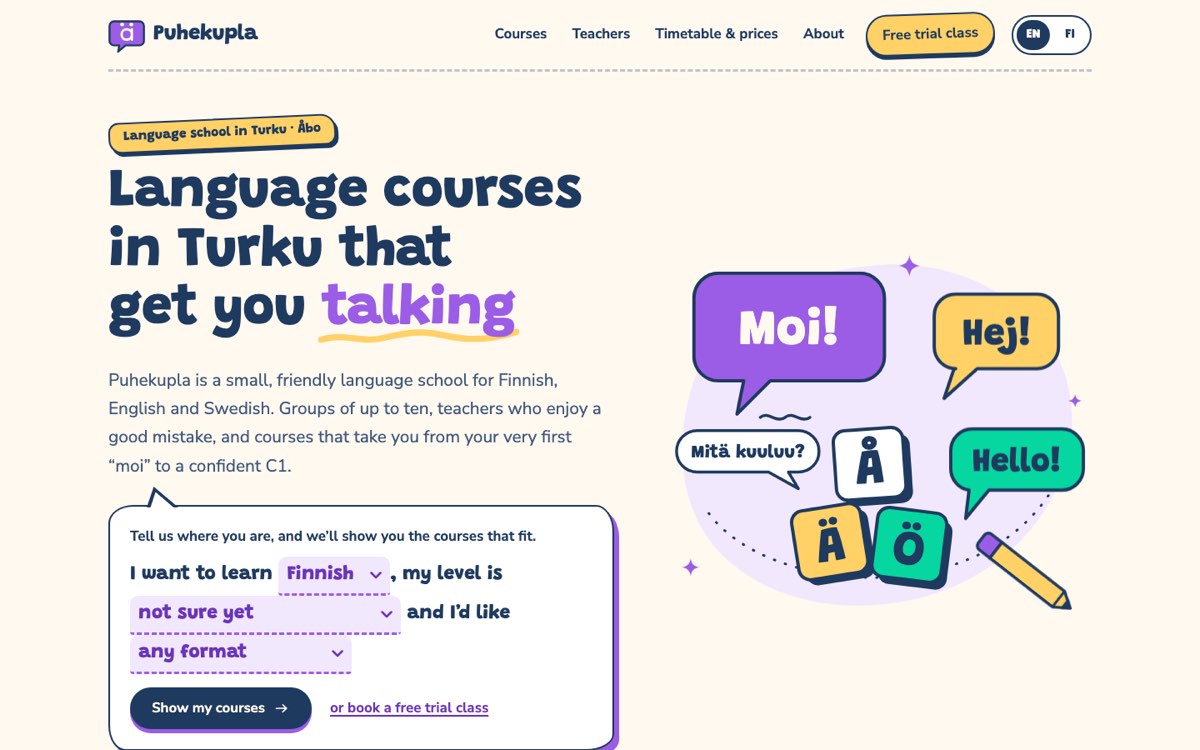
Puhekupla Language School is a fictional school in Turku, Finland, teaching Finnish, English and Swedish to adults. VirtueInfo created it to show what we build, and it is not a client. The teachers, courses, dates and prices are all sample data, and the footer says so. The demo is bilingual English and Finnish, with every page available in both.
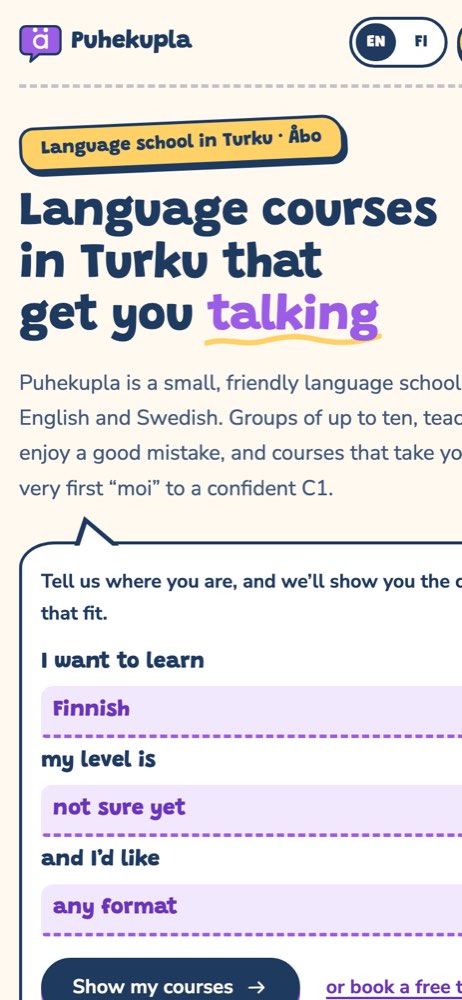
The home page opens with a course finder written as a sentence: I want to learn a language, my level is this, and I would like this format. Submitting it opens the course list with those filters already applied. Below sit the three languages, a CEFR ladder that describes A1 to C1 in everyday terms, the four course formats, three steps for the trial class and a short FAQ.
The course list holds thirteen sample courses. Learners filter by language, level and format, and the page shows how many courses match, or a helpful message when none do. The filter choice stays in the page address, so a learner can share a link to Finnish evening courses at A2. The Finnish A1 page shows what a full course page looks like: who it suits, what you can do after twelve weeks, a syllabus in two-week themes, the next two groups and the price.
The timetable page lists the weekly classes by day and room, filters by language, and adds the January intensives and a price table by format. The teachers page has six illustrated profiles with the languages each person speaks, filtered by language taught. Every "try a free class" link carries the course and level into the trial booking form, so the learner only adds days, a time of day and contact details. The form checks required fields and the email format, then shows a thank-you screen.
Local SEO built in
Each page marks the school as a schema.org EducationalOrganization, with the city, the region it serves and office hours. Course pages add Course data with offers and scheduled groups, and the home page and course page carry FAQPage data. Page titles pair the language and level with the city, such as a Finnish beginners course in Turku, in both English and Finnish.
We match the school name, address, phone and hours to your Google Business Profile. The demo uses self-hosted fonts and inline SVG illustrations, which keeps pages small and fast. Because Puhekupla Language School is invented, its demo stays out of search results, while a real language school site launches open to Google with a sitemap and canonical tags. A client site launches fully indexable, with a sitemap, language alternates between versions and search console set up.
Notes for each market
India
Many learners in India are preparing for a test, a job abroad or a university place, so course pages should name the exam and the level they aim at. Prices go in rupees, and learners expect to ask questions and receive the schedule on WhatsApp. UPI payment links fit well where your fee system supports them.
USA
Use American spelling and prices in dollars. Many schools serve both adults learning English and English speakers learning Spanish or another language, so the course finder should start with the language choice. Company and online courses are often the main enquiry for business clients.
Canada
Spelling follows Canadian usage and prices are in Canadian dollars. Schools in Québec, or those teaching French and English, usually need the site in both languages. Many learners are newcomers, so plain wording on schedules and levels helps.
Australia
Use Australian spelling and prices in Australian dollars. Schools that enrol international students on a student visa must show their provider registration details, which can sit in the footer of every page. Course pages should state whether a course suits visitors, residents or students on a visa.
Finland
Sites usually need Finnish and English, and Swedish in bilingual cities like Turku. Prices go in euros with any discounts for students, jobseekers or pensioners stated plainly. Exam preparation, such as for YKI, should link to the official registration and make clear the school is not the test organiser unless it is.
What we deliver and how the project runs
We design the site to your brand rather than reusing the playful speech-bubble look of the demo. We set up your courses, levels, formats and timetable with your coordinator, and write course pages from your real syllabus, teachers and prices in each language you need.
Trial bookings and company enquiries can go to your office email, your CRM or your booking system. After launch we hand over the site with notes on adding a course, updating term dates and changing prices. Our UI and UX design team can plan the course finder and booking flow around how your learners search.
Send us your current course list and timetable, and ask us for a quote.